Tag: graphic designing

  • AI Revolution: How Artificial Intelligence is Dominating Video, Graphics, and Audio โ€“ And Whatโ€™s Next

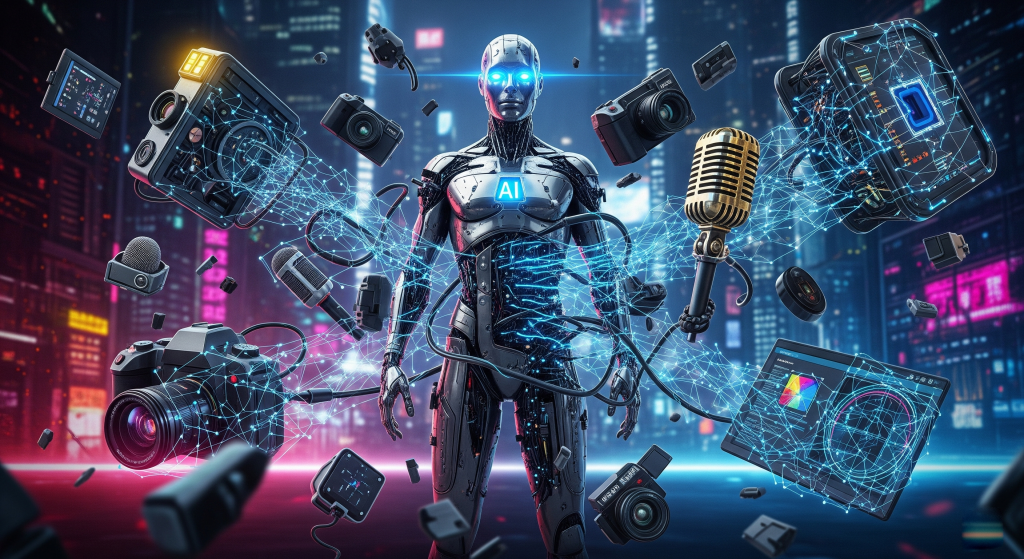
    It's a depiction of how artificial intelligence is dominating video, graphics, and audio.

    Introduction: The AI Takeover in Creative Industries

    The creative world is undergoing a seismic shift, and artificial intelligence (AI) is at the helm. From generating lifelike videos to composing original music and designing stunning graphics, AI-powered tools are transforming how content is madeโ€”democratizing creativity while raising questions about the future of human artists.

    AI is offering unprecedented efficiency, personalization, and automation, and as it continues to evolve, what does this mean for professionals in video production, graphic design, and audio engineering?

    In this deep dive, weโ€™ll explore:

    • How AI is reshaping video creation (with tools like VideoExpress & VidToon)
    • The rise of AI-generated voiceovers (Speechlo & beyond)
    • AI-powered design (Adobe Firefly, Canva, and more)
    • The future of human-AI collaboration in creative industries
    • Ethical concerns and the balance between automation and artistry

    AI in Video Production: From Editing to Full-Generated Content

    The Rise of AI Video Tools

    Gone are the days when video production required expensive equipment, weeks of editing, and specialized skills. AI-powered platforms like VideoExpress and VidToon now enable anyoneโ€”from small businesses to influencersโ€”to create professional-quality videos in minutes.

    • VideoExpress: This tool uses AI to automate video editing, suggesting cuts, transitions, and even background music based on the contentโ€™s tone.
    • VidToon: Specializing in animated explainer videos, VidToonโ€™s AI simplifies character animation, lip-syncing, and scene transitions, making animation accessible to non-artists.

    AI-Generated Deepfakes & Synthetic Media

    AI doesnโ€™t just assistโ€”it can create. Deepfake technology (like Synthesia and D-ID) allows businesses to generate hyper-realistic virtual presenters, eliminating the need for actors. While controversial, this tech is being used in marketing, e-learning, and even filmmaking.

    The Future of AI in Video

    • Real-time AI video enhancement (upscaling, color correction, stabilization)
    • Fully AI-scripted and generated short films (experiments like OpenAIโ€™s Sora)
    • Personalized video ads (AI tailoring content to individual viewers)

    AI in Audio: Voice Cloning, Music Composition & Beyond

    AI Voiceovers & Text-to-Speech Revolution

    Tools like Speechlo and Murf.ai provide studio-quality voiceovers in multiple languages and accents, eliminating the need for human voice actors in many cases.

    • Speechlo: Specializes in natural-sounding AI voices for commercials, audiobooks, and YouTube content.
    • Adobe Podcast AI: Enhances audio recordings by removing background noise and improving clarity automatically.

    AI-Generated Music & Sound Design

    Platforms like Boomy and AIVA allow users to generate royalty-free music by simply selecting a genre and mood. Even big players like Sony and Warner Music are experimenting with AI-composed tracks.

    The Future of AI in Audio

    • AI mastering & mixing (LANDR already offers AI-powered mastering)
    • Personalized soundtracks (AI adapting music in real-time for games & videos)
    • Voice cloning for dubbing & audiobooks (ethical concerns remain)

    AI in Graphic Design: From Automation to Generative Art

    AI-Powered Design Tools

    Adobeโ€™s Firefly, Canvaโ€™s Magic Design, and DALLยทE 3 are making graphic design faster and more intuitive.

    • Adobe Firefly: Generates images, vectors, and textures from text prompts.
    • Canva AI: Automates layout suggestions and even creates designs from scratch.
    • MidJourney & Stable Diffusion: Produce stunning digital art in seconds.

    The Impact on Human Designers

    While AI speeds up workflows, it also raises concerns about originality and job displacement. However, many designers now use AI as a collaboratorโ€”generating concepts that they refine.

    The Future of AI in Graphics

    • AI-assisted branding (automated logo & style guide generation)
    • 3D modeling via AI (NVIDIAโ€™s AI tools are already doing this)
    • AR/VR design automation (AI creating immersive environments)

    The Human Factor: Will AI Replace Creatives?

    The Pros of AI in Creative Industries

    โœ… Democratization โ€“ Small creators can now compete with big studios.
    โœ… Efficiency โ€“ Faster editing, designing, and production.
    โœ… Cost Reduction โ€“ No need for large teams for basic tasks.

    The Cons & Ethical Concerns

    โŒ Job Displacement โ€“ Will AI replace voice actors, editors, and designers?
    โŒ Copyright Issues โ€“ Who owns AI-generated art or music?
    โŒ Loss of Authenticity โ€“ Will human creativity become obsolete?

    The Hybrid Future: AI as a Collaborator

    The most likely scenario is human-AI collaboration, where:

    • Creatives use AI for brainstorming & rough drafts
    • Professionals focus on high-level strategy & emotional storytelling
    • New jobs emerge (AI trainers, hybrid artists, ethics consultants)

    Whatโ€™s Next? Predictions for AI in Creative Fields

    ๐Ÿ”ฎ By 2030:

    • AI may write, direct, and edit short films.
    • Virtual influencers (AI-generated) could outnumber human ones.
    • AI could win a Grammy or Oscar in a “Best AI-Assisted Work” category.

    Final Thoughts: Embrace or Resist?

    AI is not just a toolโ€”itโ€™s a paradigm shift. Platforms like VideoExpress, VidToon, Speechlo, Adobe Creative Cloud, and Preply (for AI-powered learning) are just the beginning.

    The key for creatives? Adapt. Those who learn to harness AI will thrive, while those who resist may get left behind. The future isnโ€™t about AI vs. humansโ€”itโ€™s about AI and humans working together to push creativity further than ever before.

    What do you think? Will AI elevate creativity or replace it? Letโ€™s discuss in the comments!

  • Why Adobe Creative Cloud is the Undisputed Champion of Design & Video Editing (And Why the Competition Canโ€™t Compete)?

    adobe cc banner

    Choosing design and video editing software is like picking a pizza toppingโ€”sure, you could go with plain cheese, but why would you when thereโ€™s a supreme option with everything you need? Thatโ€™s Adobe Creative Cloud. Itโ€™s not just goodโ€”itโ€™s the gold standard for a reason.

    Other apps? Theyโ€™re like that one friend who says, โ€œI can totally cook!โ€ and then serves you undercooked spaghetti. Adobe, on the other hand, is the Michelin-starred chef of creative software.

    So, letโ€™s break down exactly why Adobe CC dominatesโ€”and why alternatives just canโ€™t measure up.


    1. The Ultimate Creative Suite (Like a Buffet, But Every Dish is Amazing)

    Adobe Creative Cloud isnโ€™t just one toolโ€”itโ€™s a full creative arsenal. Photoshop for photo editing, Illustrator for vector graphics, Premiere Pro for video editing, After Effects for motion graphics, InDesign for layouts, and more. Itโ€™s like having a professional studio in your laptop.

    Why This Matters:

    • Seamless workflow: Need to edit a photo in Photoshop, drop it into an Illustrator design, then animate it in After Effects? No problem. Everything works together.
    • No app hopping: Other software forces you to juggle multiple programs (and pray theyโ€™re compatible). Adobe keeps it all in one ecosystem.
    • Professional-grade tools: While free apps give you basic functionality, Adobe gives you depthโ€”layers, masks, advanced color grading, and AI-powered features that actually work.

    The Competition? Theyโ€™re like ordering ร  la carteโ€”you might get what you need, but youโ€™ll pay in time and frustration.


    2. Industry Standard = Career Insurance

    Walk into any design agency, video production house, or marketing team and say, โ€œI donโ€™t use Adobe.โ€ Watch as they slowly back away like you just admitted to editing videos in Windows Movie Maker.

    Why This Matters:

    • Clients and employers expect Adobe files (.PSD, .AI, .PRPROJ). If you hand them a GIMP or Affinity file, theyโ€™ll look at you like you brought a cassette tape to a Spotify meeting.
    • Collaboration is effortless because everyone speaks the same Adobe โ€œlanguage.โ€ No weird file conversions or lost layers.
    • Tutorials and resources are everywhere. Need to learn something? There are millions of Adobe tutorials. Good luck finding in-depth guides for that niche free alternative.

    The Competition? Sure, you can use something elseโ€”but good luck explaining why your files donโ€™t open correctly.


    3. Constant Updates (Unlike That One App You Bought in 2012 That Still Thinks Itโ€™s Relevant)

    Yes, Adobe uses a subscription model, and yes, people love to whine about it. But letโ€™s be real:

    Why This Matters:

    • You always have the latest version. No more paying for โ€œupgrade feesโ€ every few years.
    • New features actually improve your workflow (unlike some apps that just change the UI for no reason).
    • Cloud integration means your files, fonts, and settings sync across devices.

    The Competition? Some still sell โ€œperpetual licensesโ€ that become obsolete faster than a meme from 2016.


    4. Integration So Smooth, It Feels Like Magic

    Ever tried moving a project from Final Cut Pro to DaVinci Resolve? Itโ€™s like trying to fit a square peg into a round hole while blindfolded.

    Why This Matters:

    • Dynamic Link lets you move between Premiere Pro and After Effects without rendering.
    • Adobe Fonts syncs across all appsโ€”no more โ€œOops, that font doesnโ€™t exist here.โ€
    • Libraries let you share assets (colors, logos, graphics) between projects and teammates.

    The Competition? โ€œPlease manually re-import all your files and hope nothing breaks.โ€


    5. The Alternatives Areโ€ฆ Fine (If You Like Limitations)

    Letโ€™s compare:

    TaskAdobe CCThe Competition
    Photo EditingPhotoshop (AI tools, non-destructive editing)GIMP (Great if you love wrestling with UX from 2005)
    Vector DesignIllustrator (Precision, scalability)Inkscape (Free, but slower than a dial-up connection)
    Video EditingPremiere Pro (Pro-level features)DaVinci Resolve (Amazing color grading, clunky editing)
    Motion GraphicsAfter Effects (Industry leader)Blender (Fantastic for 3Dโ€ฆ but not this)

    Sure, some alternatives are goodโ€”but Adobe is consistently excellent at everything.


    6. The Ecosystem: More Than Just Software

    Adobe isnโ€™t just appsโ€”itโ€™s cloud storage, Adobe Fonts, stock assets, Behance portfolios, and collaboration tools. Itโ€™s a complete creative ecosystem.

    Why This Matters:

    • Adobe Stock gives you high-quality photos, videos, and templates.
    • Behance lets you showcase your work and get discovered.
    • Cloud Documents let you work from anywhere.

    The Competition? โ€œHereโ€™s a watermark and a โ€˜Buy Premiumโ€™ pop-up.โ€


    Is Adobe CC Worth It?

    If youโ€™re a casual user, maybe you can survive with free alternatives. But if youโ€™re serious about quality, speed, and not fighting your software, Adobe is the clear winner.

    Is it perfect? No. Is it worth the price? Absolutelyโ€”if you value your time and sanity.

    So, whatโ€™s it gonna be? The creative suite that professionals rely on, or the budget option that makes you question your life choices?

    (Spoiler: Choose Adobe.)


    Agree? Disagree? Drop a commentโ€”or just quietly accept that Adobe has already won. ๐ŸŽจ๐Ÿ’ป๐Ÿ”ฅ

    For Adobe CC subscription click here.